Best Node.js Hosting: 9 Hosts Priced With the Database
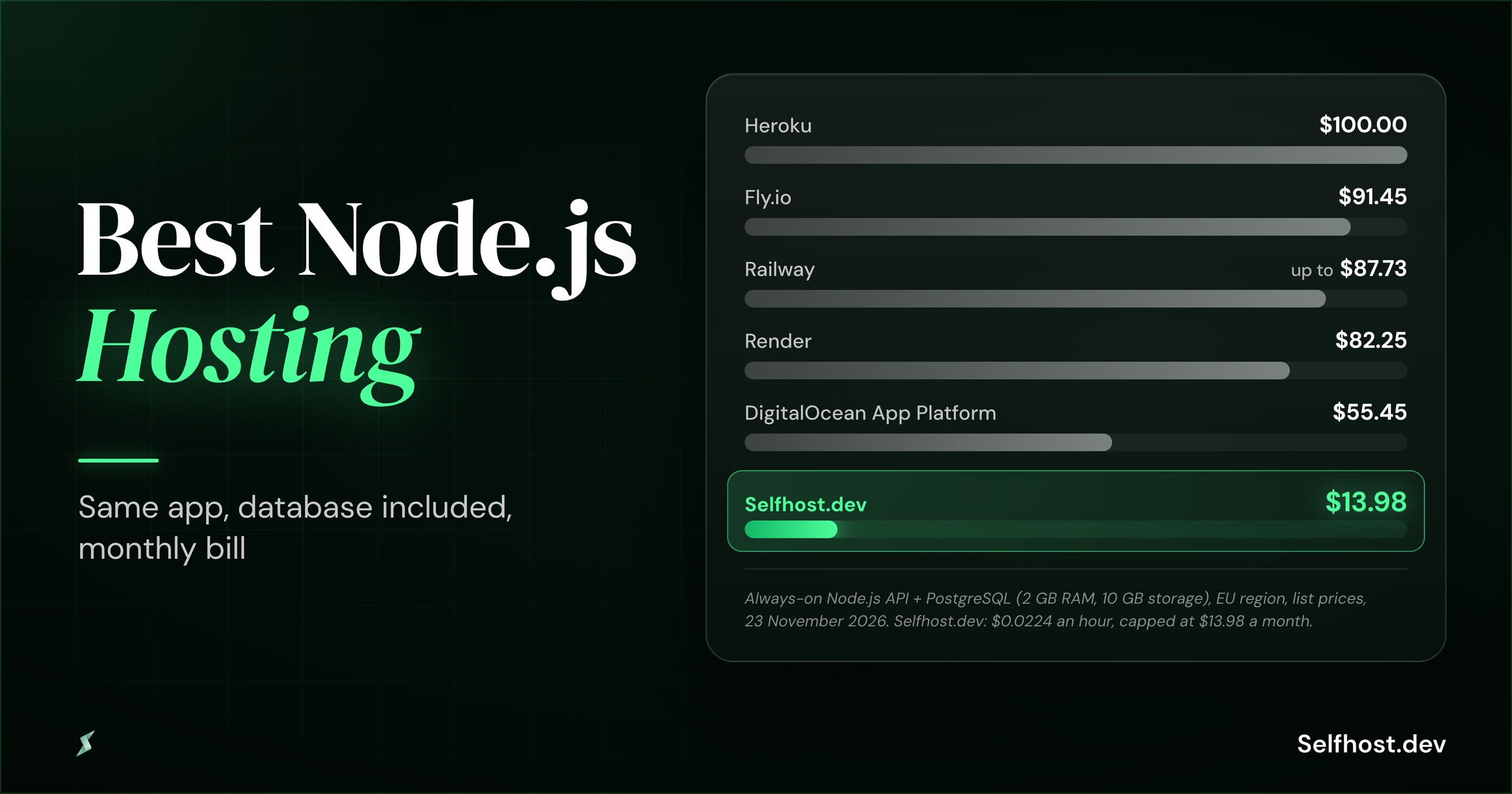
The best Node.js hosting for an always-on API with Postgres costs $55 to $100 a month on managed platforms, and $13.98 on Selfhost.dev. Those are full monthly bills for the same app, with the database included.
Most Node.js hosting lists quote each host’s cheapest plan, and that plan rarely includes a database. So this post prices one real app on 9 hosts: a Node.js API that never sleeps, plus a PostgreSQL database with 2 GB of RAM and 10 GB of storage.
Selfhost.dev, which publishes this post, is one of the 9 hosts. Its row uses the same app and the same rules as every other row. This is a pricing and platform comparison built from each host’s own pricing pages and docs; we did not run performance tests.
Prices from each host’s own pricing page and docs, checked 23 November 2026 · EU region · 730-hour month · Prices checked by Dr. Somya · Updated November 2026
Table of Contents
KEY FACTS
- Same app, 9 hosts: an always-on Node.js API with a Postgres database (2 GB of RAM, 10 GB of storage) costs $55.45 to $100 a month on managed platforms (EU region, November 2026).
- The database is the hidden half: Postgres is $30.45 to $74.80 of each managed bill, the part a starting price leaves out.
- Running it yourself: a 4 GB server costs $20.09 a month on Hetzner in Helsinki or $24 on a DigitalOcean Droplet, before backups and your own admin time.
- Hostinger’s managed plans: Hostinger’s managed Node.js plans run MySQL only and don’t support inbound WebSockets, according to Hostinger’s own docs.
- Selfhost.dev: runs the API and Postgres on one managed 2 vCPU / 4 GB server for $13.98 a month, billed by the hour. See that server priced in the calculator.
Best Node.js hosting providers by use case
The best Node.js hosting provider depends on the app. Selfhost.dev fits an always-on API with Postgres at $13.98 a month. Render suits teams that want web, worker and database as separate managed services. Railway suits bursty apps billed by use. Fly.io suits apps that run in many regions. Hetzner suits developers who run Linux themselves.
Selfhost.dev Node.js hosting picks: same app, EU region (November 2026)
| Situation | Best host | Why | Monthly for this app |
|---|---|---|---|
| Always-on API + Postgres, at a server’s price without server admin | Selfhost.dev | API and database on one managed server, billed by the hour | $13.98 |
| Web, worker and database as separate managed services | Render | Each service sized and managed on its own, deployed from Git | $82.25 |
| Bursty app that is idle most of the day | Railway | Bills CPU and memory by actual use | Up to $87.73 at full use |
| Users spread across many regions | Fly.io | Machines placed close to users, region by region | $91.45 |
| Team already built on Heroku add-ons | Heroku | Mature add-on marketplace and Git deploys | $100.00 |
| DigitalOcean shop that wants point-in-time recovery | DigitalOcean App Platform | Managed Postgres with daily backups and 7-day recovery | $55.45 |
| Developer who enjoys running Linux | Hetzner or a DigitalOcean Droplet | The cheapest hardware, with all the admin on you | $20.09 / $24.00 |
| Next.js front end | Vercel | Built for Next.js; Express runs as functions, and WebSocket connections close at the function time limit | Not priced (no always-on server) |
| PHP or MySQL site with a small Node app | Hostinger managed Node.js | Flat price on a long prepaid term | No built-in Postgres (MySQL only) |
Running an API and Postgres on one server? The 2 vCPU / 4 GB server from this table is preloaded in the Selfhost.dev calculator at $13.98 a month. Change the hours or size and see your number, no signup.
Moving off one of these hosts is covered in our posts on Render alternatives, Railway alternatives, Heroku alternatives and Selfhost.dev vs Railway.
Node.js hosting comparison: a Node API + Postgres priced on 9 hosts
A Node.js API with Postgres (2 GB of RAM, 10 GB of storage) costs $55.45 to $100 a month on managed platforms in an EU region. The same app costs $20.09 to $31.20 on a server you run yourself. Selfhost.dev runs it for $13.98 a month, or $16.78 with daily backups.
How the bills in this section are priced (checked 23 November 2026)
- The app: a Node.js API with about 1 vCPU and 2 GB of memory, running 24/7 with no sleep
- The database: PostgreSQL with about 1 vCPU and 2 GB of memory, 10 GB of storage, backups where the tier includes them
- About 100 GB of outbound traffic a month, one team seat
- 730 hours a month, list prices in USD, an EU region (Frankfurt, Amsterdam or Helsinki)
- Units as each host publishes them: some use GB, some GiB (1 GiB is about 1.07 GB)
- The prices are each host’s own, linked from every host name and listed in Sources. The same-app workload, the app + database + traffic totals and the managed vs self-run split are Selfhost.dev’s work.
Selfhost.dev Node.js hosting cost check: one Node API + Postgres on 9 hosts, EU region (November 2026)
| Host | App | Database | Storage + traffic | Monthly | Matched or differs |
|---|---|---|---|---|---|
| Heroku | $50.00 Standard-2X | $50.00 Standard-0 | $0 2 TB soft limit | $100.00 | App gets 1 GB, not 2 GB |
| Fly.io | $14.65 shared-cpu-1x, 2 GB | $72.00 Managed Postgres Starter | $4.80 | $91.45 | Database includes high availability |
| Railway | $40.58 1 vCPU, 2 GB | $42.15 1 vCPU, 2 GB, 10 GB volume | $5.00 egress | Up to $87.73 | Billed by use; a quiet API costs less |
| Render | $25.00 1 CPU, 2 GB | $43.00 1 CPU, 2 GB, 10 GB | $14.25 95 GB over the 5 GB included | $82.25 | Matched |
| DigitalOcean App Platform | $25.00 1 vCPU, 2 GiB | $30.45 2 GiB, 30 GiB minimum | $0 200 GiB included | $55.45 | Matched |
| DigitalOcean Droplet (you run it) | $24.00 2 vCPU, 4 GiB, app + database | on the same server | $0 4,000 GiB included | $24.00 $31.20 with daily backups | You do the server admin |
| Hetzner CPX22, Helsinki (you run it) | $20.09 4 GB, app + database | on the same server | $0 20 TB included | $20.09 $23.99 with backups | You do the server admin; Germany costs $23.59 |
| Hostinger managed Node.js | $2.79 48 months prepaid, renews at $16.99 | Not built in MySQL only; an external Postgres is billed separately | Included | No built-in Postgres | No inbound WebSockets |
| Selfhost.dev | $13.98 2 vCPU, 4 GB, app + database | on the same server | $0 not billed separately | $13.98 $16.78 with daily backups | No free tier; bills from the first hour, never sleeps |
Priced in an EU region; Render, Railway, Heroku and DigitalOcean charge the same in the US. Railway’s total assumes both services use their full CPU and memory all month.
Same price check, different setups. These are comparable monthly costs, not identical architectures. Managed platforms run the database on its own infrastructure, and Fly.io’s includes high availability. Selfhost.dev and the two servers you run yourself put the app and database on one server, so one server failure affects both. Teams that need the database on its own machine can attach a dedicated managed PostgreSQL instance on Selfhost.dev, with Multi-AZ failover. Our guide to what breaks first when a database scales covers when that step is worth it.
The formula: monthly bill = app + database + storage and traffic. Railway bills per second: $0.00000772 per vCPU-second and $0.00000386 per GB-second, so each 1 vCPU / 2 GB service costs $40.58 over 730 hours. The 10 GB volume adds $1.58 and 100 GB of egress adds $5.00. A usage bill like Railway’s moves with traffic; Bill Variance measures how far it swings month to month. Fly.io (Frankfurt): $7.73 machine + $6.92 extra memory + $72 database + 10 GB × $0.28 + 100 GB × $0.02. Selfhost.dev: $0.0224 an hour, capped at $13.98 in a calendar month (the cap is reached after about 624 hours), plus 20% for daily backups.
For the wider platform picture, see what 7 PaaS platforms cost in our PaaS pricing comparison.
Why the database doubles the bill
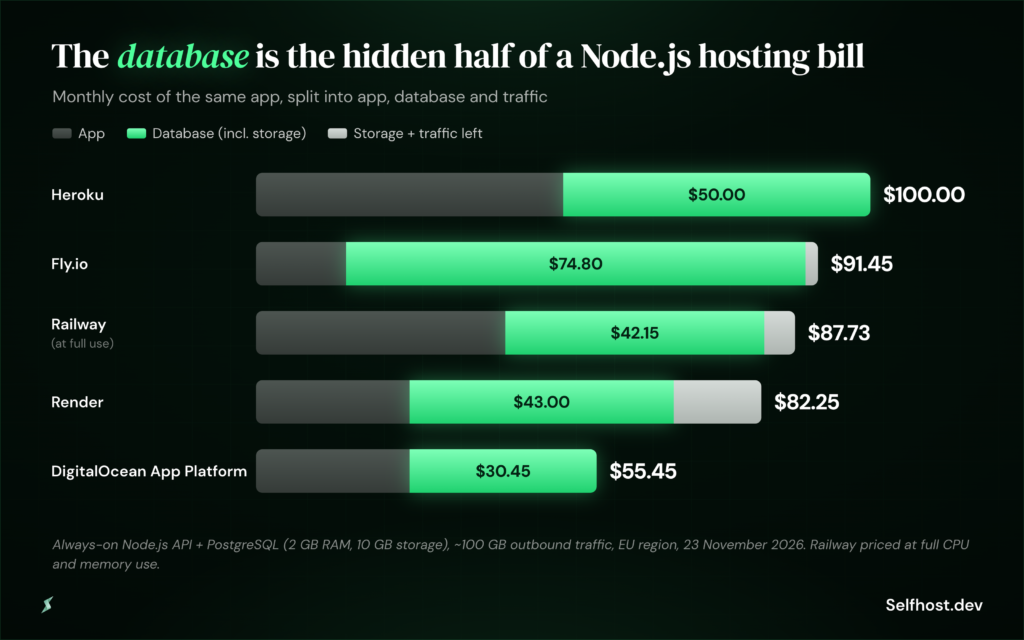
Postgres costs $30.45 on DigitalOcean, $43 on Render, $50 on Heroku and $74.80 on Fly.io, storage included. On every managed platform, the database costs as much as the app or more. Starting prices hide this, because the cheapest plan on most hosts is an app with no database at all.
The gap matters most for small APIs. A $25 app service turns into an $82 bill on Render once Postgres and traffic are added. For Postgres priced on its own, see our managed PostgreSQL comparison and our pick of the best managed database services.
Hostinger’s managed Node.js plans and Postgres
Hostinger’s managed Node.js plans have no built-in Postgres as of November 2026. Hostinger’s database guide for Node.js says: “Hostinger currently offers MySQL databases only. Other database engines (PostgreSQL, MongoDB, etc.) are not supported on shared or managed hosting plans.”
Hostinger’s Node.js limits page adds: “Every plan stops a request after 120 seconds and doesn’t support inbound WebSockets or always-running background workers.”
Hostinger points Postgres users to its VPS plans instead, according to its supported databases page. The same guide says an app can connect to an external database provider instead, billed separately. The managed plans suit a PHP or MySQL site with a small Node app. An API that needs WebSockets or a background worker needs another host.
Cheap Node.js hosting: what the starting prices leave out
Cheap Node.js hosting starts at $2.79 to $5 a month, but those prices leave out the database, always-on running or a long prepaid term. Priced as an always-on API with Postgres, the cheapest options are Selfhost.dev at $13.98 a month managed, and Hetzner at $20.09 if you run the server.
- Hostinger: $2.79 a month requires paying 48 months upfront ($133.92), renews at $16.99, and the plan runs MySQL only.
- DigitalOcean App Platform: the cheapest Node.js service is $5 a month, but this app with managed Postgres costs $55.45.
- Heroku: Eco dynos cost $5 a month and sleep after 30 minutes without traffic.
- Railway: the Hobby plan caps storage at 5 GB, so a 10 GB database needs the Pro plan.
- Render: the free web service sleeps, and free Postgres expires after 30 days.
The pattern: a cheap Node.js plan is cheap because it drops one of three things. It drops the database, the always-on process or the monthly billing. Check which one before you compare numbers.
Selfhost.dev bills its 2 vCPU / 4 GB server at $0.0224 an hour with nothing prepaid, capped at $13.98 a month. See the monthly total for the hours you run, with the server preloaded.
Node.js VPS hosting: cheaper, if you run the server
Node.js VPS hosting costs $20.09 a month on a 4 GB Hetzner server in Helsinki or $24 on a 4 GiB DigitalOcean Droplet. Either holds the API and Postgres together. The catch is the work: you secure the server, run Node and Postgres, set up TLS and handle backups and updates yourself.
What you run yourself on a Node.js VPS, compared with Selfhost.dev (November 2026)
| Task | On a VPS you run | On Selfhost.dev |
|---|---|---|
| SSH keys, firewall, OS security updates | You | Done for you |
| Install Node.js, keep the process alive (PM2 or Docker) | You | Done for you (build detected from package.json) |
| Reverse proxy and TLS certificate (Nginx or Caddy) | You | Done for you (HTTPS issued and renewed) |
| Install, tune and back up Postgres | You | Postgres added to the project; daily server backups +20% |
| Deploy on every Git push, roll back a bad deploy | You build it | Auto-deploy on push, one-click rollback |
| Logs, metrics, crash alerts | You set them up | Streaming logs, live metrics, crash emails |
| Server backups | Hetzner +20%, DigitalOcean +20% weekly or +30% daily | +20% daily |
Selfhost.dev gives a Node.js app a dedicated server at a VPS price, with the server admin done for you.
Postgres is the hardest part to run yourself: backups, upgrades and tuning never stop. Our guide to managed vs self-hosted databases covers that trade in detail. A VPS is still the right call if you enjoy running Linux or need root access. If you deploy with a Dockerfile, the Docker hosting page covers that route on Selfhost.dev.
The Node.js hosting page shows the server we’d put your app on, its hourly price and what is set up for you: GitHub deploys, a custom domain and SSL.
What a production Node.js host should include
A production Node.js host should keep the app process always on, back up the database, roll back a bad deploy, keep logs and serve HTTPS on your own domain. These five features decide how much work it takes to keep an API running. Hosts differ on whether each is included, billed extra or left to you.
Selfhost.dev production checklist: what each host includes at the tier priced above (November 2026)
| Host | Always on | Postgres backups | One-click rollback | App logs | Free TLS on your domain |
|---|---|---|---|---|---|
| Heroku Standard-2X + Standard-0 | Yes | Rollback up to 4 days, daily backups kept 7 days | Yes | Last 1,500 lines, add-on for more | Yes |
| Fly.io shared-cpu-1x + Managed Postgres Starter | Only with auto-stop off idle Machines stop by default | Included retention not published | No redeploy an earlier image from the CLI | Yes, 7 days | Yes, first 10 certificates free |
| Railway Pro | Yes sleep is opt-in | Pro: daily, kept 6 days, billed as storage | Yes | Yes | Yes |
| Render Hobby workspace, 1c-2g + Postgres 2 GB | Yes | 3-day point-in-time recovery | Yes, last 5 builds | Yes, 7 days | Yes |
| DigitalOcean App Platform 2 GiB container + Postgres 2 GiB | No sleep mode documented | Daily backups + 7-day point-in-time recovery | Yes, last 10 deploys | Build logs; runtime logs need forwarding | Yes |
| Hetzner or Droplet (you run it) | Yes | Whole-server image, paid add-on not Postgres-aware | You build it | You set it up | You set it up |
| Hostinger managed Node.js | One process; no always-running workers | No Postgres MySQL with daily backups | No redeploy only | Build logs; runtime errors in a file | Yes |
| Selfhost.dev 2 vCPU / 4 GB project server | Yes | Daily backups of the project server, +20% | Yes | Yes, streaming | Yes, issued and renewed |
How to read the columns. Always on means the app process keeps running without traffic. Postgres backups with point-in-time recovery restore the database to a chosen minute; daily backups restore to the last backup. One-click rollback means the dashboard restores an earlier deploy. Free TLS means a certificate on your own domain at no charge.
Connection limits matter too. Render’s 2 GB Postgres plan allows 100 connections, so a Node app running several processes may need a pooler; see how to size a PgBouncer pool.
The one to watch is Fly.io. Its fly launch command stops idle Machines by default, so an always-on API needs auto_stop_machines set to off. Fly.io also has no one-click rollback: you redeploy an earlier image from the command line.
Vercel and serverless hosts for an Express API
Vercel runs an Express app as Vercel Functions, not as a server that stays running. Since October 2026, those functions support WebSocket connections, but every connection closes at the function’s time limit: 300 seconds on Hobby, up to 800 seconds on Pro. Background workers and long jobs still need a server that stays on.
Vercel also no longer sells its own Postgres. Its Postgres docs point to Marketplace providers such as Neon, Supabase and Prisma Postgres, billed separately. Our Vercel vs Railway comparison covers how those bills add up.
Vercel is the right pick for a Next.js front end. Clients that hold WebSockets open on Vercel need reconnect logic, because each connection ends at the time limit. A common setup keeps the front end on Vercel and moves the API and database to a host that stays on.
Free Node.js hosting: what you get and when it sleeps
Free Node.js hosting suits demos and side projects, not APIs that must answer 24/7. Render’s free web service sleeps after 15 minutes without traffic and takes about a minute to wake. Its free Postgres database expires after 30 days. Railway and Fly.io give small monthly credits instead.
Free Node.js hosting tiers, checked November 2026
| Host | Free tier | Sleeps? | Database | Limit to know |
|---|---|---|---|---|
| Render | Free web service, 750 instance hours a month | Yes, after 15 minutes | Free Postgres for 30 days | About a minute to wake |
| Railway | 30-day trial with $5 credit, then $1 a month in credit | Yes, when idle | Inside the credit | 0.5 GB volume, 3 services |
| Fly.io | $1 of credit, $5 of usage a month once you add a card | Idle Machines stop by default | Paid | A card unlocks the monthly usage |
| Vercel | Hobby plan, $0 | Functions, no server | Marketplace providers | Personal, non-commercial use; functions run up to 300 seconds |
| Heroku | None | Eco dynos ($5) sleep after 30 minutes | Paid | No free tier |
| DigitalOcean App Platform | Static sites only | Not applicable | Paid | No free Node.js service |
When the API has to answer at 3 a.m., the always-on bills in the cost table apply. For free databases on their own, see our guide to free PostgreSQL hosting.
Selfhost.dev starts new accounts with a $5 welcome credit, no card needed. On the 2 vCPU / 4 GB server, that credit covers more than a week of running.
How Selfhost.dev hosts a Node.js API and Postgres
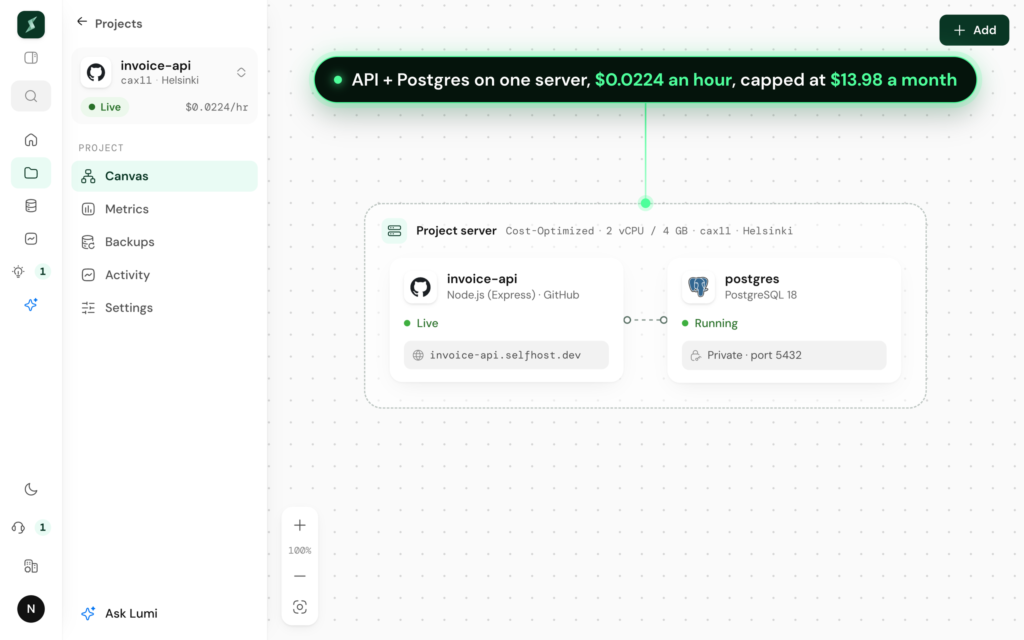
Selfhost.dev runs Node.js apps and Postgres on a managed 2 vCPU / 4 GB server from $13.98 a month in the EU, billed hourly with no tiers or prepaid terms. The API, its database and any worker share one server, billed as one server.
What you get on that server:
- One bill for the whole app. The API, a Next.js front end, a worker and their Postgres database run on the same project server, billed as one server.
- Hourly billing, nothing prepaid. The server costs $0.0224 an hour and never more than $13.98 in a calendar month. There are no per-seat or per-service fees and no separate bandwidth line.
- Deploys handled. Selfhost.dev detects the build from package.json, deploys on every push, opens preview environments for pull requests and rolls back a bad deploy in one click.
- HTTPS and logs included. A custom domain gets HTTPS issued and renewed automatically. Streaming logs, live CPU and memory metrics and crash emails show how the app runs.
- Room to grow. Daily backups add 20%, for $16.78 a month in total. The server scales from 2 vCPU up to 48 vCPU and 192 GB of memory.
Render’s free tier suits a hobby API that can wait about a minute to wake. Selfhost.dev has no free tier: a project server bills from its first hour, at $0.0224 an hour, and in return it never sleeps. For an API that customers call at any hour, a server that never sleeps is the point.
Any framework works: Express, NestJS, Fastify, Koa or plain Node, built with Nixpacks or your own Dockerfile. Our guide to full-stack app hosting without DevOps covers the same setup with a front end.
Walk through a live project in the console demo, no signup. Or deploy your repo with the $5 welcome credit, no card needed, in the Selfhost.dev console.
Frequently asked questions
Before choosing a Node.js host, check four things: always-on running, Postgres in the price, backups and rollback, and how the bill is charged. Hosts charge by the hour, by use or for a prepaid term. The answers below use the same app as the tables above.
How much does Node.js hosting cost?
An always-on Node.js API with Postgres (2 GB of RAM, 10 GB of storage) costs $55.45 to $100 a month on managed platforms. That range covers DigitalOcean App Platform, Render, Railway, Fly.io and Heroku. A server you run yourself costs $20.09 to $31.20. Selfhost.dev runs the same app for $13.98 a month, billed by the hour (EU region, November 2026).
Where should I host a Node.js app with a database?
Host a Node.js app by how it runs. An always-on API with Postgres fits a managed server such as Selfhost.dev, at $13.98 a month, or a VPS you run yourself. A bursty app fits usage billing such as Railway. Separate managed services fit Render. A Next.js front end fits Vercel.
Can Hostinger host a Node.js app with PostgreSQL?
Not with a built-in database. Hostinger’s own docs say its managed Node.js plans offer MySQL only, and that PostgreSQL is supported on its VPS hosting instead. An app can connect to an external Postgres provider, billed separately. The plans also stop requests after 120 seconds and don’t support inbound WebSockets (November 2026).
Is Railway or Render cheaper for a Node.js API?
Render is cheaper for an always-on Node.js API with Postgres: $82.25 a month against Railway’s ceiling of $87.73 at full use. Railway bills CPU and memory by actual use, so a quiet API can cost less there. Our Railway vs Render comparison breaks down both bills in more detail.
Can I host a Node.js app for free 24/7?
Not reliably. Render’s free web service sleeps after 15 minutes without traffic, Railway’s free credit sleeps when idle and Heroku has no free tier. Free tiers suit demos and side projects. An API that must answer 24/7 needs a paid, always-on server, as priced in the cost table above.
Is a VPS or a PaaS better for Node.js?
A VPS is cheaper per gigabyte of memory, but you run the server: security updates, the Node process, TLS, Postgres and backups. A PaaS such as Render or Heroku runs all of that for you at $82 to $100 a month for this app. Selfhost.dev sits between them: a managed server at a VPS price.
What is Node.js hosting?
Node.js hosting is a server or platform that runs a Node.js application continuously and serves it on the internet. It ranges from shared web hosting with a Node.js add-on, to platforms such as Render and Heroku, to a virtual server you set up yourself. Production APIs need an always-on process and a database.
Which Node.js host to pick for your app
Choose Selfhost.dev if your app is an always-on API with Postgres and you want a server’s price without running the server. It costs $13.98 a month, billed by the hour, with deploys, HTTPS and logs handled. The app and its database share one server, so the bill doesn’t move with traffic.
Choose something else if your needs are narrower:
- Render for separate managed web, worker and database services
- Railway for a bursty app billed by use
- Fly.io for users in many regions
- Hetzner if you enjoy running Linux
- Vercel for a Next.js front end
The reason is the same in every case: the database and the always-on process decide the bill, not the starting price.
Deploy your Node.js API and PostgreSQL on one managed server, from $13.98 a month, with the $5 welcome credit and no card needed.
Sources
- Railway: pricing, plans, regions
- Render: pricing, free tier, regions
- Heroku: pricing, dyno types, regions, limits
- DigitalOcean: App Platform pricing, managed databases pricing, Droplet pricing, backup pricing
- Fly.io: pricing, Managed Postgres
- Hetzner: cloud servers, billing FAQ
- Hostinger: Node.js hosting, MySQL for Node.js, supported databases, Node.js limits
- Vercel: pricing, Postgres, WebSockets, WebSocket support generally available (20 October 2026), function duration
- Selfhost.dev: pricing, Node.js hosting